If you've been searching for an honest Adjust MySour review, you've landed in the right place. We're the team behind the Adjust line at Lost Mary, and this is our full, hands-on Adjust MySour 40K review covering everything from the sour intensity system to flavor performance, battery life, and how it compares against the rest of the Adjust family. Spoiler: it starts with four adjustable sour intensity levels and keeps delivering from there.
The Adjust MySour 40K is not just another high-puff disposable. It is the world's first customizable sour vape, built for people who want complete control over the tang in their flavor profile. From the digital display to the triple mesh coil to the USB-C rechargeable battery, every component is engineered to give you a better, more personal vaping experience.
Below, we cover everything from the full spec breakdown and how to switch sour levels, to flavor-by-flavor notes and how the MySour stacks up against the rest of the Adjust Vape family.
Table of contents
What Is the Adjust MySour 40K?
The Adjust MySour 40K is a rechargeable disposable vape from the Adjust line by Lost Mary. It is designed around one core innovation: letting you dial your sour intensity up or down in real time, so each flavor profile changes character depending on how tangy you want it.
Specification |
Details |
Puff Count |
Up to 40,000 puffs |
E-Liquid Capacity |
20mL |
Battery Capacity |
850mAh (rechargeable) |
Charging Port |
USB-C |
Coil Type |
Triple mesh coil |
Sour Intensity Levels |
4 levels (Sour Tickle, Sour Vibes, Sour Rush, Sour Overload) |
Airflow |
Adjustable |
Power Modes |
Adjustable |
Display |
Full digital display (battery, e-liquid, sour level, power mode) |
Nicotine Strength |
5% (50mg/mL) nicotine salt |
Available Flavors |
5 flavors |
Quick Specs at a Glance
The digital display is one of the standout practical features here. At a glance, you can check your battery level, remaining e-liquid, your current sour setting, and your active power mode. No guessing when you're running low.
Design and Build Quality
The Adjust MySour 40K has a slim, ergonomic build with a soft TPU mouthpiece that is comfortable for extended sessions. The full-color digital display is positioned on the front face of the device and reads clearly indoors or outdoors. Two side buttons handle all your adjustments: one controls sour intensity, the other switches power modes.
Build quality is solid. The casing feels durable, and the device does not feel bulky despite housing a full display and an 850mAh battery. The USB-C port is located at the base and is recessed to protect against accidental contact. The adjustable airflow ring sits just below the mouthpiece and lets you go from a tighter, more restricted draw to a fuller, airier inhale.
Each flavor variant ships in its own color scheme, so if you pick up more than one, you can tell them apart at a glance. The overall aesthetic is clean and modern without being flashy.
How to Use the Sour Intensity Levels: A Step-by-Step Guide
This is the section no other review covers in depth, and it is the core reason MySour is in a class of its own. Here is exactly how it works.
How to Switch Sour Levels
Press the sour intensity button (left side button) to cycle through the four settings. The current level is shown on the digital display immediately. You can switch at any point, including mid-session, and the change takes effect on your next puff. There is no need to hold the button or restart the device.
Sour Tickle (Level 1)
The lightest setting. You get the base flavor of the e-liquid with just a gentle acidic note on the finish. This is a great starting point if you are new to sour profiles or prefer something closer to a traditional fruit vape. Pairs best with Sour Island and Sour Pinkberry, where the fruit notes are naturally sweet and benefit from a subtle tang rather than an aggressive one.
Sour Vibes (Level 2)
Sweet and sour come together in balanced proportion at this level. The flavor opens up significantly here, and you get the full character of the e-liquid plus a satisfying tang on the exhale. This is the sweet spot for most users. Works exceptionally well with Sour Peach Raspberry, where the natural sweetness of peach holds its own against the added acidity.
Sour Rush (Level 3)
The intensity climbs noticeably at Sour Rush. This is the candy-store level: tart, bright, and mouth-watering. Your cheeks will react. Best paired with Sour Blue Razz Ice and Sour Grapple, where the sharper, more acidic fruit profiles are designed to handle and showcase this level of sourness. The icy finish on Blue Razz Ice cuts through the tartness cleanly at this setting.
Sour Overload (Level 4)
Maximum sour. This is the full-send setting, and it is not for the faint of heart. The sourness is intense and sustained from inhale to exhale. If you are a dedicated sour candy fan who always reaches for the most extreme option in the bag, this is your setting. Sour Grapple at Sour Overload is particularly striking, with the grape and green apple notes amplified into something that tastes like a liquid Warhead.
Adjust MySour 40K Flavors: Full Lineup Reviewed
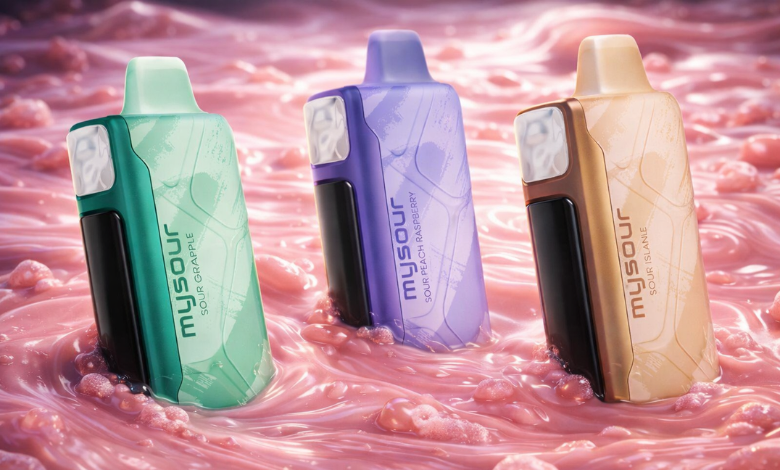
There are five flavors in the Adjust MySour range, and each one is purpose-built to interact with the sour level system. Here is the full breakdown.
Tart blue raspberry leads on the inhale, followed by a cool, icy exhale that reinforces the sharpness rather than dulling it. At Sour Tickle, it tastes like a classic blue raspberry candy. At Sour Rush, the tartness intensifies, and the ice adds a sharp, almost electric edge. Best for: Sour Rush or Sour Overload. Best for first-timers who enjoy cool fruit flavors.
Grape and green apple together, with a more acidic bite than sweetness. The green apple note carries most of the sourness, while the grape rounds out the body. This flavor scales the best across all four levels. At Sour Tickle, it is a pleasant fruit blend; at Sour Overload, it earns its name. Best for: Sour Rush to Sour Overload.
A tropical mix of fruits with a restrained sour note that creeps in on the exhale. The blend is more complex than the other flavors, with several layers that reveal themselves as you work through the sour settings. At Sour Tickle and Sour Vibes, it tastes like a premium tropical punch. At Sour Rush, the acidity brings individual fruit notes forward. Best for: Sour Tickle to Sour Vibes for those who prefer tropical over sharp.
A pairing of sweet ripe peach and zingy raspberry. The peach provides a soft, juicy base while the raspberry delivers the tartness. This is the most approachable of the five flavors. At Sour Vibes, it is perfectly balanced. At Sour Rush, the raspberry takes the lead, and the peach becomes a sweet backdrop. Best for: newcomers to sour vapes. Best setting: Sour Vibes.
A mixed berry profile with a bold, bright sourness. The berry combination here skews toward sweeter varieties like strawberry and blueberry, which means the sourness cuts through cleanly without overpowering the natural fruit character. At Sour Overload, this flavor is vivid and intensely tangy. Best for: Sour Rush to Sour Overload for a berry blast experience.
Performance: Vapor, Battery, and Coil Tested
Flavor Delivery
The triple mesh coil is the engine here. Mesh coils heat e-liquid across a larger surface area than standard coils, which means every layer of a complex flavor profile gets properly vaporized. In practice, this means you consistently get the full character of the flavor at every sour level, not just the top note. The MySour never feels muted, even at Sour Tickle.
At higher power modes, flavor intensity increases noticeably. At lower power modes, the draw is smoother and the flavor more subtle. Both have their place depending on preference.
Vapor Production
With adjustable airflow fully open and power mode set high, the MySour produces full, dense vapor clouds. Tighten the airflow and drop the power, and you get a more controlled, concentrated draw. The flexibility here is genuine: this device actually rewards experimentation with the airflow and power settings rather than offering adjustability as a marketing tick-box.
Battery and Puff Count
The 850mAh battery is rechargeable via USB-C. The digital display shows a real-time battery percentage, so you always know where you stand. Charge time from low to full is approximately 45 to 60 minutes, depending on the charger used.
At 40,000 puffs, the MySour is designed for extended use. Based on typical usage patterns of 100 to 150 puffs per day, a single device could last between 6 and 12 months. That figure will vary depending on puff length, power mode, and individual habits, but the puff count here is genuinely substantial, not a marketing exaggeration.
Adjust MySour vs. the Adjust Family: Which One Is Right for You?
The Adjust line currently includes four devices, each built around a different type of customization. Here is how they compare side by side.
Model |
Customizable Feature |
Levels |
Puff Count |
Best For |
Adjust MySour 40K |
Sour intensity |
4 |
40,000 |
Fans of bold, tangy fruit profiles |
Adjust MyCool 40K |
Cooling level |
5 |
40,000 |
Fans of icy, menthol-forward profiles |
Adjust MySweet 40K |
Sweetness level |
4 |
40,000 |
Fans of candy-style dessert profiles |
Adjust MyFlavor 40K |
Flavor intensity |
4 |
40,000 / 20,000 (Burst) |
Users who prefer full flavor control |
The MySour is the right choice if bold, tangy, citrus-forward fruit profiles are your thing. If you prefer icy, refreshing profiles, the MyCool offers five cooling levels and is a closer match. For dessert and candy profiles, the MySweet delivers four sweetness settings. The MyFlavor suits users who want intensity control over almost any flavor style rather than a single sensory dimension.
Each device in the Adjust family uses the same digital display and button system, so once you learn one, you know them all.
Pros and Cons
Pros |
Cons |
+ World's first customizable sour intensity system |
- Larger form factor due to the digital display |
+ 40,000 puffs with USB-C recharging |
- Sour-only customization (no sweet or cool modes in this variant) |
+ Triple mesh coil for consistent, layered flavor |
- Fewer flavors than some competing disposables |
+ Full digital display showing all key stats |
|
+ Adjustable airflow and power modes |
|
+ Five distinct, well-designed sour fruit flavors |
|
+ Sour level switches instantly, even mid-session |
Final Verdict: Is the Adjust MySour 40K Worth It?
Adjust Mysour 40k vape review comes down to one question: does the sour customization actually change the experience in a meaningful way? The answer is yes, and by a wider margin than you might expect. Having four distinct intensity levels is not a gimmick. It changes how the same flavor tastes, what mood it suits, and how it pairs with different power and airflow settings.
Add 40,000 puffs, a proper triple mesh coil, USB-C recharging, and a display that keeps you informed at all times, and the Adjust MySour 40K is one of the most fully realized disposable vapes available right now.
Adjust MySour 40K Frequently Asked Questions
How many puffs does the Adjust MySour have?
The Adjust MySour 40K delivers up to 40,000 puffs per device. The exact count will depend on individual puff length, power mode setting, and airflow configuration, but the device is engineered to provide consistent flavor output across its full puff capacity.
How do I switch sour intensity levels?
Press the left side button on the device to cycle through the four sour levels: Sour Tickle, Sour Vibes, Sour Rush, and Sour Overload. The current level is shown on the digital display. You can switch at any time, including between puffs. The change takes effect immediately on your next draw.
How do I charge the Adjust MySour 40K?
Connect the device via the USB-C port at the base using any standard USB-C cable. The digital display shows battery percentage during charging. A full charge from low typically takes 45 to 60 minutes. The device can be used while charging, but we recommend charging it fully before extended sessions.
Can I adjust airflow and sourness at the same time?
Yes. The airflow ring and the sour intensity button are independent controls. You can set your preferred airflow using the ring at the top of the device and adjust your sour level using the side button at any time. Experimenting with combinations of power mode, airflow, and sour level is genuinely rewarding.
Explore More from the Adjust Vape Range
Looking to try other devices from the Adjust line? Each one delivers the same quality build with a different customizable dimension:
Adjust MyCool 40K Review: Five cooling levels for icy, menthol-forward profiles
Adjust MySweet 40K Review: Four sweetness levels for candy and dessert profiles
Adjust MyFlavor 40K Review: Full flavor intensity control across a wide range of profiles
Adjust MyRusher 40K Review: Customizable power modes and adjustable airflow for a personalized vaping experience
You can shop all Adjust devices directly at LostMaryDirect.com, where you'll find the full lineup alongside our complete range of Lost Mary disposable vapes.