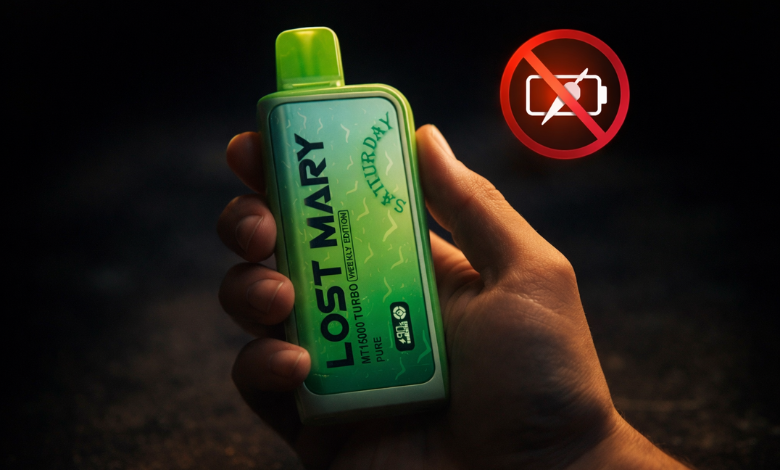
If you're facing issues with your Lost Mary MT15000 Turbo not charging, you're not alone. Many vapers have encountered charging problems with their devices, but don't worry—this issue can typically be resolved with a few simple steps. In this blog, we’ll walk you through the most common causes and solutions for Lost Mary Vape charging issues, so you can get back to enjoying your vape experience without delay.








Lost Mary MT15000 Turbo Overview
Lost Mary MT15000 Turbo is currently one of the most talked-about disposable vapes available. It's built to deliver up to 15,000 puffs, features a powerful dual-mesh coil system, and offers two distinct vaping modes: Regular and Turbo. The Regular mode gives you smooth, consistent vapor, while Turbo mode cranks up the intensity for bigger, bolder hits.
This gadget's rechargeable battery design sets it apart from the competition. Unlike older disposable vapes that you simply toss when the battery dies, the Lost Mary MT15000 Turbo is designed to be recharged and used until the e-liquid runs out. It comes with a built-in 900mAh battery and charges via a USB-C port, which is a nice touch for anyone who's already living the USB-C lifestyle.
The device also features a transparent e-liquid window so you can always see how much juice you've got left, plus an LED display that shows battery percentage and puff count. It's a genuinely impressive piece of hardware, which makes it all the more frustrating when charging issues come up. What's good? The majority of those problems can be resolved.
Reasons Why the Lost Mary MT15000 Turbo Is Not Charging
If you're dealing with a Lost Mary Turbo that's not charging, the cause usually comes down to one of several common culprits. Here's a breakdown of what might be going on:
1. A Dirty or Obstructed Charging Port
This is probably the most common reason your device isn't charging. Dust, lint, and pocket debris have a way of sneaking into charging ports over time. If the connection between your cable and the port isn't clean and solid, the charge simply won't transfer properly.
2. A Faulty or Incompatible Cable
There are differences among USB-C cables. If you're using a cheap, off-brand cable or one that's been through the wringer, it might not be delivering consistent power to your device. Even a cable that works fine for your phone might not perform well with your vape.
3. A Damaged Charging Port
If your device has taken a drop or been jostled around in your bag, the charging port itself might be physically damaged. Even minor damage can prevent a proper connection from forming.
4. An Overheated Battery
Vaping and charging at the same time, or leaving your device in a hot car, can cause the battery to overheat. When that happens, the Lost Mary MT15000 Turbo has built-in safety features that will prevent charging until the battery cools down to a safe temperature.
5. The Battery Is Completely Drained
Sometimes a battery that's been sitting dead for too long takes a little while to respond when you first plug it in. It might look like nothing is happening, but the device could actually be in a slow-charge recovery mode.
6. A Software or Display Glitch
On rare occasions, the LED display might show incorrect battery information due to a minor glitch, making it seem like your device isn't charging when it actually is.
7. A Defective Unit
It's not super common, but manufacturing defects do happen. You might have received a device with an internal issue if you've tried everything and nothing works.
How to Fix the Lost Mary MT15000 Turbo Not Charging Issue
Here's how to actually solve the issue now that you know what could be causing it. Examine each of these steps individually to determine which one works best.
Step 1: Check and Clean the Charging Port
Examine your device's USB-C port closely using a flashlight. If you see any lint or debris in there, use a dry toothpick or a can of compressed air to gently clear it out. Take care not to damage the internal pins. Once it's clean, try charging again.
Step 2: Swap Out Your Charging Cable
Try a different USB-C cable, ideally one you know is working well. If you have access to a name-brand cable, use that one. Plug it in and wait a few minutes to see if the LED display shows any charging activity.
Step 3: Try a Different Power Source
The wall adapter or USB port you're using might not be delivering enough power. Switch to a different outlet or wall adapter, or try plugging into a laptop or desktop USB port. Occasionally, the power source rather than the gadget is the issue.
Step 4: Let It Cool Down
If your device feels warm to the touch, set it down somewhere cool and let it sit for 15 to 20 minutes to return to room temperature. Once it's cooled off, plug it back in and see if it starts charging.
Step 5: Give It Time to Wake Up
If your battery ran all the way to zero, plug it in and leave it alone for at least 30 minutes before checking the display. A fully depleted battery sometimes needs a bit of time before it responds.
Step 6: Unplug and replug to reset
After unplugging your gadget, wait 30 seconds before re-plugging it. Sometimes this simple reset clears a minor electronic hiccup and gets things back on track.
Step 7: Contact Support
If you've tried all of the above and you're still dealing with a Lost Mary MT15000 that won't charge, it's time to reach out. You might qualify for a replacement if your device is still covered by warranty. Please don't hesitate to contact our support staff; they are always available to assist.
How to Charge Your Lost Mary MT15000 Turbo
If you're new to the Lost Mary MT15000 Turbo or just want to make sure you're doing it right going forward, here's the proper way to charge your device and keep it in great shape.
What You'll Need
a dependable power source and a USB-C cable. That's all. You don't need any special equipment because the Lost Mary MT15000 Turbo uses standard USB-C charging.
Step-by-Step Charging Process
-
Find the USB-C port on your device's underside.
-
Your USB-C cable should have one end plugged into the port.
-
Attach the other end to a laptop, wall adapter, or other dependable USB power source.
-
Check the LED display on your device. It should light up and show the current battery percentage, which confirms charging has started.
-
Leave the device plugged in until it reaches 100% or until you're ready to use it.
-
You can now proceed by unplugging it.
Tips to Keep Your Battery Healthy
-
Don't charge your device overnight on a regular basis. Overcharging over time can wear down battery performance.
-
Particularly when charging, keep your device out of direct sunlight and extremely hot temperatures.
-
When not in use, keep it somewhere dry and cool.
-
Try not to let the battery hit zero too often. Charging it before it fully drains helps maintain battery health over time.
-
Always use a quality USB-C cable. Cheap cables can cause inconsistent charging and, in rare cases, create safety issues.
You can maximize the performance of your Lost Mary MT15000 Turbo each and every time you charge it by following these instructions.
Final Takeaway
Dealing with a Lost Mary vape not charging MT15000 Turbo situation is genuinely annoying, but in most cases, it's something you can fix pretty quickly at home. Whether it's a dirty port, a bad cable, an overheated battery, or just a fully drained cell that needs time to wake up, running through the troubleshooting steps above will solve the problem for the majority of users.
The MT15000 Turbo is a solid, high-quality device, and taking a little care when charging it will keep it performing at its best for as long as the e-liquid lasts. If you're ever stuck and can't figure out why your Lost Mary Turbo is not charging? Our team at LostMaryDirect.com is just a message, call, or email away.
We're here for you every step of the way.
FAQs
Why is My Lost Mary MT15000 Turbo Battery Running Out So Quickly?
Your battery is likely draining fast because you're primarily using Turbo mode, which draws significantly more power than Regular mode. Turbo mode is designed for bigger, more intense hits, but it comes at the cost of faster battery consumption. Try switching to Regular mode for everyday use and saving Turbo mode for when you really want that extra punch.
How much time does it take to charge the Lost Mary MT15000 Turbo?
Depending on your power source, it usually takes 60 to 90 minutes to fully charge the MT15000 Turbo from a low battery level. Using a quality wall adapter will generally give you a faster charge compared to plugging into a laptop or low-output USB hub. The device's LED display allows you to track development in real time. Once it hits 100%, you're ready to go.
How Long Can I Expect the Lost Mary MT15000 Turbo to Last on a Single Charge?
On a full charge, most users get through several hundred puffs before needing to plug back in, though the exact number depends on how you vape. Using Regular mode consistently will stretch your battery life further, while heavy Turbo mode use will burn through the charge more quickly. Since the MT15000 Turbo is a rechargeable disposable rated for up to 15,000 puffs total, you'll be recharging it multiple times throughout its lifespan before the e-liquid runs out.
Why is My Lost Mary Blinking While It's Charging?
Blinking during charging is usually normal and is simply your device communicating its status through the LED indicator. A slow, steady blink typically means the device is actively charging. A rapid blink, however, can sometimes signal a charging error, a loose connection, or an issue with the power source. If you notice rapid or unusual blinking, unplug the device, check that the cable and port are properly connected and clean, then try a different cable or power source. If the blinking continues after switching everything out, reach out to our support team for further help.
Have more questions about Lost Mary Vape? We're here for you! You can reach out through the contact form, give us a call at (720) 328-7756, or send us an email at support@lostmarydirect.com. If you have any questions, our helpful staff at Lost Mary Direct would be happy to assist you.